AI / Frontend / Developer Tools
Rough Edges in Today's AI Agents for Frontend Development
Where frontend agents still break down, and the browser and tooling changes that could make them more capable.
So starting earlier this year I started to incorporate AI as of my workflow because I am starting to think its state is good enough for doing FE.
Now this post is not to discourage people to not utilize AI, it is quite the opposite. It is good enough now. but I want to push it further. So I share some of my finding and my idea. If other people found inspiration or even turns my idea into reality? Great! I will gladly use that product (if the price make sense for my pocket of course).
Now now, before someone trying to tell me “well maybe your prompt is wrong”, “fix your prompt, I promise it will result better”. let me tell you the things I already tried:
-
enhancing my prompt with giving example
-
attach screenshot to my prompt
-
connect the AI to Figma using Figma MCP
-
connect the AI to JIRA using Atlassian MCP
-
using Claude.md, Agents.md, and all that md exist out there
if you don’t think my effort is enough, here is some extra effort I have been doing:
-
Building MCP for the design system my company used which I have very good hope for apparently.
-
Customizing and extending the AI plugin I used in my editor (full code) (I use neovim btw)
So, if those are not convincing you how much I want this to work, I don’t know what is.
I want to live that dream, where I can prompt AI with design, and having it able to debug on its own, taking screenshot, comparing screenshot in Figma, and fix the design discrepancies all while I watch Chinese drama in some random app.
But.. I tried Lovable/Bolt/Replit and it is awesome
first of all, good for you.
But I think I need to explain which kind of project/environment I test all the effort I mentioned before with.
So I am currently working in a company where the company have a Design System published as private package.
And then I work in a monorepo consisting of multiple dashboard built using Next.js, with total LoC in github repo (excluding gitignored directory and files) around 300K lines.
I think safe to say what I want to do is what a normal FE guy who work in a company want to do.
ok lets continue with listing the issues I found
MCP and the tale of no telling how much context the AI want

this might be a general problem and seems widely known
not enough context → AI don’t know what to do → AI hallucinate
too much context → AI confused what to do → AI hallucinate
this is what happened when I do experiments in the early MCP hype and everyone build MCP of everything. I tried to connect cursor to everything I have access to: Jira, Figma, Notion, even building my own MCP mentioned above.
I tried to explore in an empty project using my company FE starter pack (which an empty react app with our DS installed)
I then compare a few iteration like this :
-
without any MCP
-
with our DS (Design System) MCP
-
Figma only MCP
-
DS MCP + Figma MCP
-
DS MCP + Figma MCP + JIRA MCP
-
DS MCP + Figma MCP + JIRA MCP + Notion PRD
turns out at that time at least, 2 is the sweet spot. after adding Figma, the AI start to hallucinate.
for Example, it is confused which source of truth it should use, whether the instruction in the Design System MCP, or the data it gets from inspecting the Figma.
But what surprise me is 2 is better than 3. yes I tried to give the AI only the Figma MCP and it result is worsen. Because there is actually too much noise in Figma nodes/objects.
One of the issue I found is nesting frame/components in Figma. I tried to give the AI link to the whole screen, but it can only get up to 2 to 3 depths.
Meaning lets say your Button component paths it looks like
Page Frame → Modal → Modal Body → Form → Form Action → Button
then it can’t even reach to get the style of that Button. and not to mention even a Button component in Figma can look like
Button → Button Icon → Icon → Actual svg
see? Figma nodes goes so deep that rumor has it that Adele rolling inside one of those nodes
But I honestly cant blame the AI though. because actually it is hard to structurally define a design in natural language. even we human usually generalize when explaining the design we see like saying “there are some links in the top” rather than like “The links is 24px from the top edge of the viewport, each has gap of 8px, and the order is … “
potential solution for this is actually an in the middle tool between Figma and AI, which can translate all of those nodes inside a Figma frame/screen into a more concise and noise-free data for translating into code
oh and please, I doesn’t mean to throw another AI agent in the middle. because:
-
it is hard to making its deterministic, moreover if what that AI do is only summarizing the view
-
not every step of the way has to be a handled by an agent. I think this is
human brain is actually so amazing in generalizing thing and subconsciously filling in the gap.
which bring to the next rough edges
it is actually so hard for AI to understand how to translate visual into code
this is has to do with how AI actually see.
AI can’t actually see like we human see. what they do is converting the image into embedding and then trying to infer code based on similarity from their training data.
see it produce code based on similarity, where in frontend we usually aim for pixel perfect design from the Figma file given.
this is also might be reason why indiehacking experience is difference with working in a company experience. when you don’t have design to match to and let AI decide the design, of course that would be easier for the AI
In my opinion this single issue is I think what make human FE engineer is still harder to replace. Unless companies want to kick their design team and let AI do the design.
the solution for this I believe still the same with point above, we need a middle thing between visual and AI. and have AI know how to translate that data into HTML/React.
but this also bring us to the next Issue
Internal library or design system is a blocker instead of helper for AI
again, because AI trained with a general data, it is so F ing hard to make it understand how to use our internal design system.
Lets not even talk about how it can understand our internal design system. it is even hard to guide it to USE the design system itself.
even with a guide in claude.md with an IMPORTANT note to use the design system, it still use the Html/tailwind to build the UI.
after some digging and trial and error, I kinda understand what the issue is. the issue is the AI itself doesn’t know which component is available.
Even though it is know which component is available, it doesn’t know the API of that component, like okay, there is a “variant” props. but what are the possible value?
for this issue I kinda partially solve it. what I do is first I add the design system project folder. and then in the design system repo i use storybook and have a very extensive documentation. and by extensive I mean.. EXTENSIVE. like I ask Claude to generate sample story for each possible case/props combination
the second thing I do to solve is, in the project level folder, I created docs (with AI of course) of how to implement each component, with a reference to actual usage inside the project. for example I have those

with the content more or less
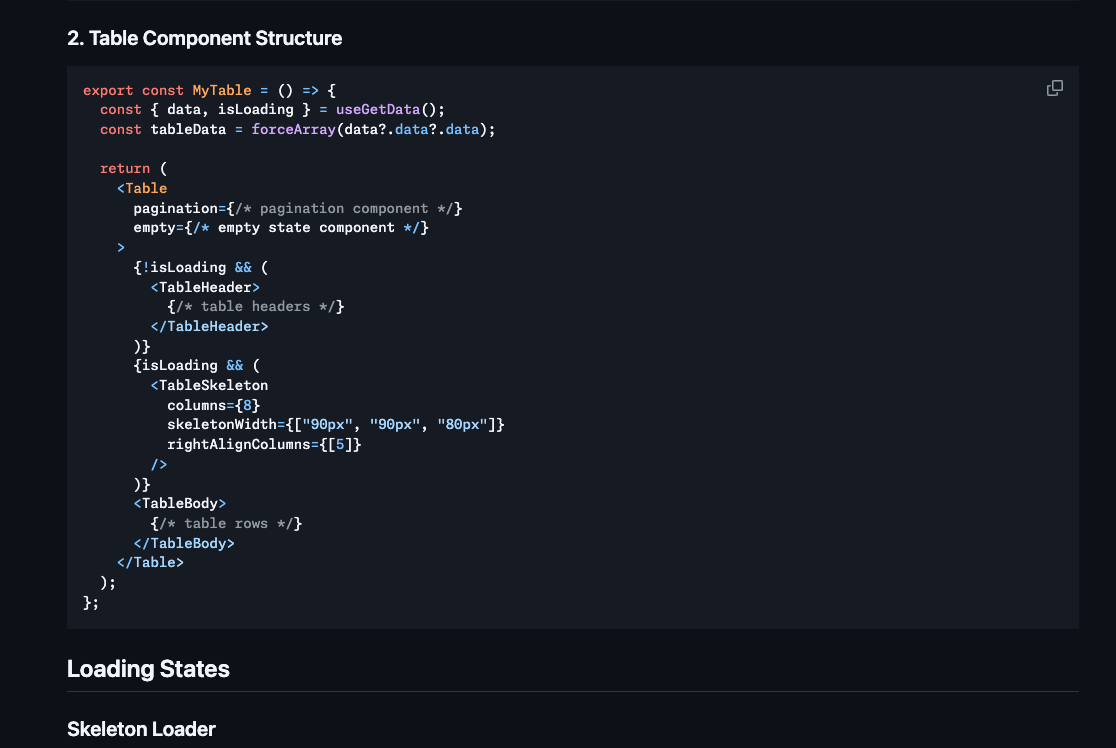
You know, even with all these effort I usually sometime still get case where AI use wrong props like <Button variant="ghost" /> while there is no “ghost” variant in my Button component. or sometime it even still not use the internal design system at all..
someone said AI is a level of a junior engineer, if I hire junior engineer and he does that even with all of those data and example I will revoke his access to the project repo.
but yeah when that certain case arise the docs we created earlier become handy because we can just “your implementation is wrong, check the docs again!” and he will check the docs and usually the implementation is better and use the design system
I honestly think there are no generic solution for this. I think the only thing can make it better is to fine tune the AI model with our company codebase.
you might think “why not add it to system prompt”, but that will eat the context window.
Maybe in the future there are solution to this like the context window become so big it doesn’t matter to put it there, or the AI just became so smart that if it already be given a docs and example it never hallucinate again.
AI still keep over-engineering things
at the current state I feel AI still over-engineer things and also have tendency to create more code than needed.
I think the issue is because if our requirement we give to them is vague somehow they tried to overthink than oversimplify.
by the way this is even after I have specific section in CLAUDE.md and I spesifically ask to always write simple implementation and don’t implement anything that is not being asked
one example of it I think when I want to implement a hotkey system in a web app.
it goes wild doing things like:
-
extremely complex code to detect OS because apparently it think user agent is not reliable because it is editable
-
browser current focus detection
-
hotkey reassigning detection
-
and probably other complex check
and for me that is crazy. well maybe this is because how smart AI is, but I don’t think how it connect the dot of their knowledge is very good
for example, yes user agent is not reliable, but this is for a hotkey not for some fraud detection. Most user won’t intentionally change their user agent. why does it connect the knowledge of that user agent edge case with a case for building hotkey feature?
and that browser current focus detection, I think that is to handle very edge case where the input is focused and we are redefine some hotkey that is also used inside input (think of cmd +c and cmd+v)
but I also don’t need that since I won’t assign hotkey for those.
there is a software engineer idiom YAGNI (You ain’t gonna need it), and I follow it by heart, I wish my AI agent too. I even think it is better to undershoot than overshoot. some people might have difference opinion on this though so yeah it make it hard to build generic AI agent that satisfy everyone.
Actually I think this issue is also related to how can I check/verify implementation is correct or enough in the browser, which bring us to the next point
Automated browser test is soooooo hard
So what I am thinking is how beautiful it is when the AI can do these development feedback loop that human usually do:
-
check figma
-
implement code
-
check browser and see if implementation correct
-
fix issue, then go back to point 1 or 3
so far the only issue is point 3. and this even has nothing to do with the AI itself.
if you ever doing browser automation you would know. browser automation like playwright is actually doing thing via debugger protocol.
so for example things like “clicking” element is actually not the same as user actually click it. there are lot of case when we tell playwright to click an element and it failed.
not to mention we are currently have issue regarding combobox. a lot of combobox in most of website today is not implemented using <select> and <option>. and constructed via divs and input where only them and god know how the focus being managed.
if you are ever work with a combobox where the search is inside the menu list instead of in the input value like below you would know how painful it is to manage the focus because usually a combobox would do conditional like opening the menu list based on the value container input focus. and now it basically has 2 input component while browser only assign focus to 1 element

I tried everything to make opening this dropdown works, yes everything that I can thought of:
-
using Playwright `click` function
-
using browser selector and then try element.click()
-
even when I created my own browser (electron browser) i tried using sendInputEvent
nothing works.
this is only one of the case. the other case is related to login. a lot of current web login is using SSO, passkeys, etc. that is hard to automated in isolated environment like Playwright / puppeteer. solution for this is we need to test it in the browser that we use daily instead of isolated environment.
for this case it is why I created my own browser earlier. but there are some good news related to this actually. Chrome now shipped with built in MCP
but it is still using a debugger protocol, so there will be still same issue regarding simulating user click. I think the solution for this is really if a browser or maybe some desktop app or even an MCP that can emulate user click in the lower or OS level. one example of a library is NutJS
AI way of choosing tool is not deterministic
now to conclude the list of rough edges I want to share my experience when creating a browser that has internal MCP.
I think AI is not that smart when choosing which tool to use.
for example I expose a browser click tool. but there are also other tool that allow the AI to execute JS.
there are still al lot of time that instead of using the browser click tool I expose, the AI keep using execute JS to create custom script to do element.click while my browser click tool is better because it use the internal electron API.
I think this kind of thing even happened when I am using Claude code. I notice sometime the AI is using bash script to read file instead of read file tool from claude code. some time it use `grep` sometime it use `rg`. there are no telling how it can decide which tool.
in case of browser I am thinking this can be solve by doing some engineering, like instead of giving all the tool exist we need to create detailed system prompt on how to use the tools in the tools. but the downside is it will eat up context window significantly. or maybe instead of giving the browser tool directly, the browser should internally have AI, and the MCP tool is only for the external AI to communicate with the browser’s internal AI which have detailed system prompt on how to automate the browser or even specifically trained/fine tuned to that.
Conclusion
so am I suggesting to not use AI? of course not. Actually, based on my journey, if there are single benefit that I should mention is that I am getting more understanding of how the AI works and I am getting better in distinguishing which task I should offload to AI and which task that it is better for me to handle it myself.
My conclusion, at least for me the current state of AI it is just a very smart code generator. I wouldn’t want for it to “think” for me. I usually do it for task that is tedious like refactoring, preparing a boiilerplate for a page before I work it myself, updating packages, etc.
in this case it is actually very helpful in Frontend development. because there are lot of boilerplate code in FE. like if you are working on a dashboard a lot of page usually “looks” the same but the internal thing could be very different like some search use API, some use local search. some table has pagination, some not. that is why composition over configuration API component design like Radix/ShadcnUI become very popular lately. even Tanstack Table use similar approach.
this is resulting of a lot boilerplate code that AI is actually helpful and very very good at.
this conclude my journey or the thing that I willing to do to optimize my works for now. because the solution I mentioned above is I think too big for me / I just don’t want to put that much effort for it.
but yeah, if in the future my dream can come true and AI can do the human feedback loop of doing my job. I would be very happy!